

What Is an Action Room? Group Accountability Explained (2026)
An Action Room is a shared space in Aksa where a group works on the same goal, submits proof, chats and sees each other's progress. The four tabs, host and member roles, and how rooms power group accountability.
Published October 2, 2026 · Updated October 22, 2026 · 7 min read
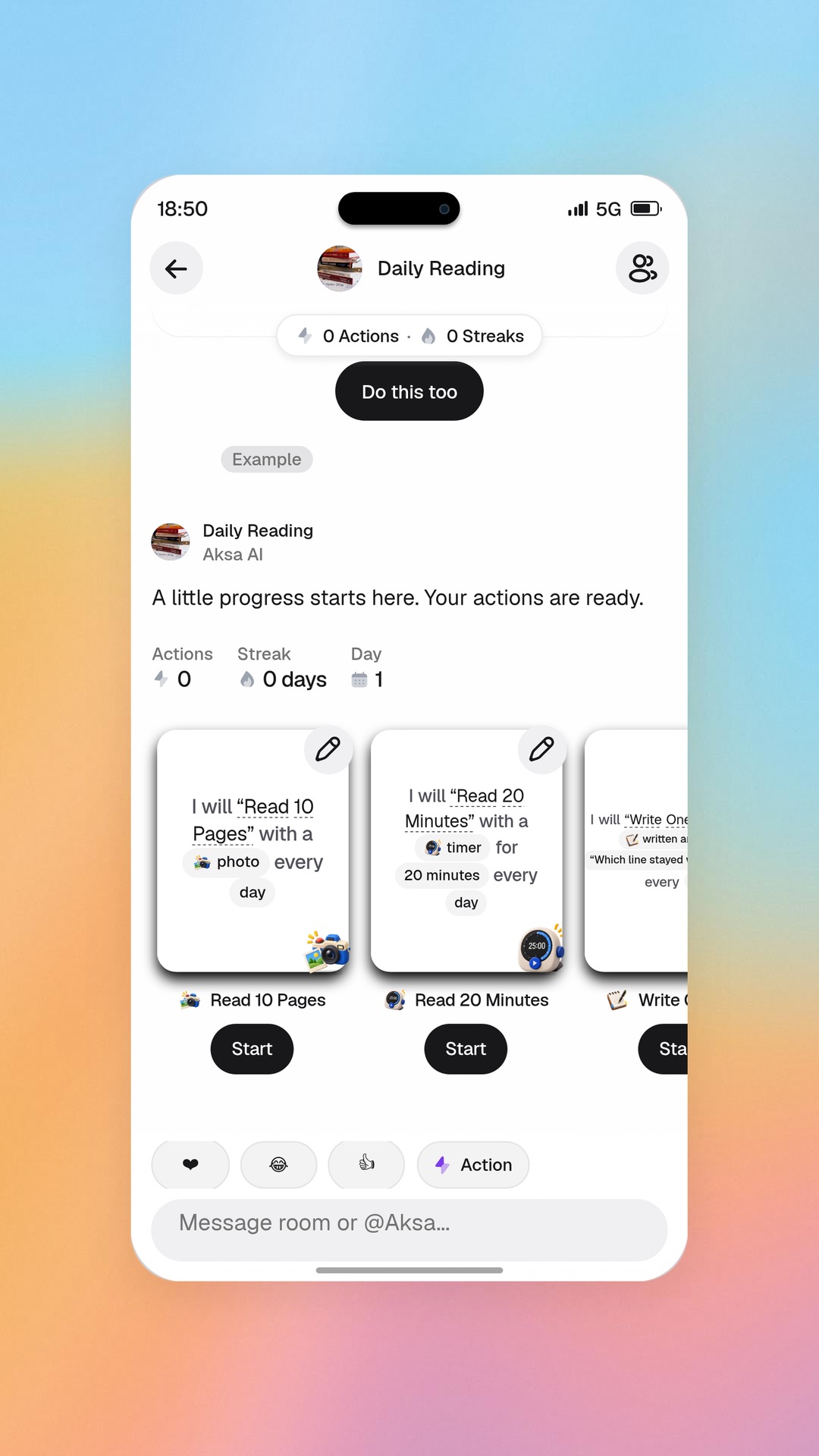
Action Room, defined
An Action Room is a shared space in Aksa where a group works on the same goal. Members see the same task list, submit their own proof, chat in the room and follow the group's progress - and a host runs the room.
The room solves the problem group chats never do: in a chat, accountability is conversation - someone must remember to ask. In a room, accountability is architecture - the checklist, the heatmap and the feed ask automatically, every day, of everyone.
Aksa is a social platform with an AI agent, and rooms are its social unit: the place where proof becomes visible, witnesses accumulate, and the weekly leaderboard gives the group a scoreboard.
What is inside a room: the four tabs
Each room has four tabs. Action: the task checklist and milestone items - the shared definition of today's work. Resources: guides, reference links and templates the host curates. Progress: a member consistency heatmap and completion history. Setting: room details, mode and member management.
Room chat, milestone task decks and resource guides are part of the room's furniture, and push notifications mark room events - including a notification when a member completes a milestone, so the room can cheer.
The four-tab split is deliberate: what we do (Action), what helps (Resources), how we are doing (Progress) and how the room runs (Setting). A group challenge's entire operating system fits in four places.
Host and member roles
The host owns the room. A host can edit the title, cover photo, milestone tasks and resources - curating what the group works on and what materials support it. One editor keeps the standard from drifting mid-challenge.
Members participate: they view the checklist and resources read-only, submit daily proofs, chat and react. The asymmetry is the point - rules set once by the host, work done daily by everyone, no committee renegotiating the task list on day nine.
Joining is a link: the host shares an invite, and invitees land directly in the host's shared room - no duplicate rooms, no splinter groups, no 'wait, which challenge are we in.'
How progress becomes visible
The Progress tab carries the room's two honest mirrors: a member consistency heatmap - everyone's days as cells, filled or not - and the completion history behind them. Nobody narrates their consistency; the heatmap shows it.
The feed carries the day's texture: each member's proofs as they land - the run photo, the study answer, the 50-push-up count - with reactions attached. Aksa reports a 36% social response rate (company-reported), so visible proofs reliably draw responses.
The effect compounds quietly: you do not need anyone to check on you, because everyone already can. The surveillance is mutual, voluntary and pointed at the work - which is exactly the kind that helps.
Private, public and the boundary that matters
Rooms can be public or private, and guests can preview public rooms before joining - useful for watching a community's rhythm before committing to it. The choice is per-room, so a person can run a private room with close friends and follow a public one for a broader goal at the same time.
The boundary that matters is the room wall: what happens in a room stays scoped to it. Proofs, chat and reactions are visible to the room's members - the audience is the membership, not the internet. Shared links and claim cards are the deliberate exceptions, not the default.
This scoping is what makes the witness effect safe to use. Visibility is a tool you aim - at six friends, at a cohort, at a public community - not a floodlight over everything you do. The goals that need darkness still get it, in solo goals outside any room.
The weekly reset - why rooms do not die
Rooms connect to the Weekly Arena: leaderboards - Individual, School and City - reset every Monday at 00:00 UTC. A member who had a terrible week starts Monday at zero, same as the leader.
The reset is the retention engine. Without it, one bad week compounds into quiet exit - why rejoin a race you have already lost? With it, every Monday is a legitimate fresh start, and the week's podium produces winner spotlight cards worth posting.
For hosts, the weekly rhythm is the management tool: review the heatmap on Sunday, welcome the reset on Monday, watch who returns. Rooms that ritualize the reset survive; rooms that treat it as a scoreboard footnote fade.
Room vs group chat vs shared doc
A group chat is conversation: accountability depends on someone remembering to ask, and the record scrolls away. A shared doc is storage: the checklist exists, but nobody's completion is visible. A room is both, plus the record - checklist, proof, progress and chat in one architecture.
The specific upgrades: proofs instead of claims ('done' becomes a photo, a timer session, a count); a heatmap instead of a memory; a weekly leaderboard instead of vibes; and notifications when milestones complete instead of announcements nobody posts.
That is why groups migrate: the chat stays for banter, but the challenge moves to the room - because the room is where the work is actually counted.
A worked example: the Tuesday evening room
6 PM: four proofs already in the feed - a morning run photo, two study timer sessions, a language-practice answer with reactions on all of them. The heatmap shows the room at 80% for the day; your empty cell is the only gap in your row this week.
6:40 PM: your own proof lands - 30-minute timer session, one-line answer attached. Two reactions within minutes. Nobody said 'have you worked out today?' - the architecture asked, the heatmap displayed, the feed confirmed.
Sunday: the weekly review shows the room's streaks and the podium; Monday 00:00 UTC the board resets; Monday evening the room is full again. That cycle - ask, show, react, reset - is what an Action Room is for.
When to use a room - and when not to
Use a room when the goal benefits from witnesses: group challenges, study cohorts, friend fitness pushes, team shipping habits. If the work is better done alongside visible peers, the room is the container.
Do not use a room for goals that need privacy - solo goals stay private in Aksa for exactly that reason. And do not use a room as a replacement for one high-bandwidth partnership: a partner notices you; a room notices everyone. Many people run both.
The test: if you would want to see the other members' Tuesday proofs, and you would not mind them seeing yours, the goal belongs in a room.
FAQ
What is an Action Room?
A shared space in Aksa where a group works on the same goal: members see the same task list, submit their own proof, chat and follow the group's progress. A host runs the room - editing the title, cover, tasks and resources - while members participate with proofs, chat and reactions.
What are the four tabs in an Action Room?
Action (the task checklist and milestone items), Resources (guides, reference links and templates), Progress (the member consistency heatmap and completion history) and Setting (room details, mode and member management). Room chat, milestone task decks and push notifications for room events are built in.
What can the host do that members cannot?
The host edits the room: title, cover photo, milestone tasks and resources. Members view the checklist and resources read-only, submit daily proofs, chat and react. The single-editor design keeps the challenge's rules from drifting mid-run.
How do people join an Action Room?
By invite link from the host. Invitees land directly in the host's shared room - the system is designed so joining never creates a duplicate room, so the group stays in one place with one task list and one heatmap.
How does an Action Room keep people accountable?
Architecturally instead of conversationally: the shared checklist asks daily, the member heatmap shows everyone's filled and empty cells, the feed displays each proof with reactions, milestone completions trigger notifications, and the weekly leaderboard resets Mondays at 00:00 UTC for a fresh start.
What is the difference between an Action Room and a group chat?
A chat is conversation - accountability depends on someone remembering to ask, and the record scrolls away. A room adds the record: shared checklist, individual proofs, a member heatmap, completion history and a weekly leaderboard, plus chat. Groups keep the chat for banter and move the challenge to the room.
Can I see other members' progress in a room?
Yes - that is the mechanism. The Progress tab shows a member consistency heatmap and completion history; the feed shows each member's proofs as they land, and visible proofs reliably draw reactions.
Should every goal go in an Action Room?
No. Rooms are for goals that benefit from witnesses - challenges, cohorts, shared pushes. Goals that need privacy belong in solo goals, which stay private. The test: if you would want to see the others' Tuesday proofs and would not mind them seeing yours, it belongs in a room.
Can I preview a room before joining?
Yes - guests can preview public rooms, which lets you watch a community's daily rhythm, proof standards and activity level before committing. Private rooms require the host's invite link. Either way, joining one room never creates a duplicate; you land in the host's shared space.